# How to display your Country’s Alphabet in Mosets tree joomla component
> Following our customers suggestions and requirements, we decided to stop supporting the Mosets tree Greek Alphabet plugin that was developed 4 years ago. Instead of this extension, we have created a useful guide that offers you the freedom to create your own custom Alphabet for the mosets tree joomla! component. Let’s remind ourselves the scope…
- URL: https://www.web357.com/blog/how-to-display-your-countrys-alphabet-in-mosets-tree-joomla-component
- Published: 2015-05-05
- Updated: 2025-09-03
- Categories: [joomla](https://www.web357.com/blog/category/joomla)
- Image: https://www.web357.com/content/images/mosets.png
Following our customers suggestions and requirements, we decided to stop supporting the **Mosets tree Greek Alphabet** plugin that was developed 4 years ago. Instead of this extension, we have created a useful guide that offers you the freedom to create your own custom Alphabet for the mosets tree joomla! component.
**Let’s remind ourselves the scope of the Mosets Tree**. Mosets tree is a directory component for Joomla! It gives you all the tools and features you need to run a business directory, real estate management system, web links directory, model profiles or almost any type of imaginable directories on your Joomla website. You can find more details in the [mosets tree](http://www.mosets.com/tree/) website as well.
**Let’s see how you can display your Country’s Alphabet in Mosets tree Joomla! component.**
### Step 1:
From joomla admin panel, navigate to Components > Mosets Tree > Templates (left sidebar) > Click on your current mosets template > \*Show Alpha Index > **Select Yes** > Save & Close.
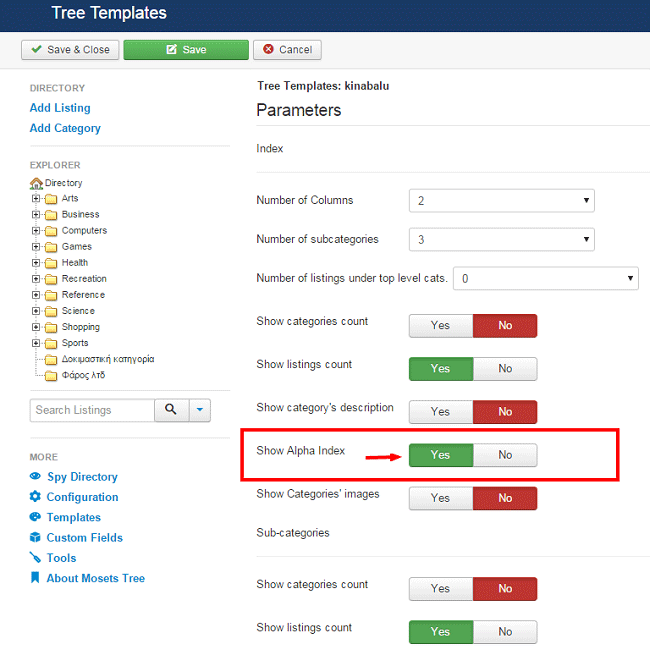
\* Show Alpha Index
_Alpha Index shows a list of alphabets on top of the Index page to provide quick access to listings and categories that start with a specific alphabet._
### Step 2:
Open the file: YOUR\_JOOMLA\_ROOT/components/com\_mtree/mtree.php
Find (line: ~1320):
```
$where[] = "link_name LIKE '" . $database->escape( $alpha, true ) . "%' COLLATE utf8_swedish_ci ";
$where_cat[] = "cat1.cat_name LIKE '" . $database->escape( $alpha, true ) . "%' COLLATE utf8_swedish_ci ";
```
Replace with:
```
// $where[] = "link_name LIKE '" . $database->escape( $alpha, true ) . "%' COLLATE utf8_swedish_ci ";
// $where_cat[] = "cat1.cat_name LIKE '" . $database->escape( $alpha, true ) . "%' COLLATE utf8_swedish_ci ";
// BEGIN: our own alphabet (Web357)
$alphacustom = JRequest::getVar('alphacustom');
if ($alphacustom):
$where[] = "link_name LIKE '" . $database->escape( $alphacustom, true ) . "%'";
$where_cat[] = "cat1.cat_name LIKE '" . $database->escape( $alphacustom, true ) . "%'";
else:
$where[] = "link_name LIKE '" . $database->escape( $alpha, true ) . "%'";
$where_cat[] = "cat1.cat_name LIKE '" . $database->escape( $alpha, true ) . "%'";
endif;
// END: our own alphabet (Web357)
```
### Step 3:
Open the file: YOUR\_JOOMLA\_ROOT/components/com\_mtree/templates/YOUR\_TEMPLATE/page\_listAlpha.tpl.php
Find (line: ~12):
```
?>alpha)) ? JText::_( 'COM_MTREE_NUMBER' ) : strtoupper($this->alpha)) )?>alpha)) ? JText::_( 'Number' ) : strtoupper($this->alpha)) )?>plugin('listalphaindex', '') ?>
```
Replace with:
```
plugin('listalphaindex', '') ?>
';
foreach ($my_alphabet_letters_arr as $letter):
echo ''.$letter.'';
endforeach;
echo '';
endif;
// END: Display letters of the alphabet (Web357)
?>
```
_Check out a very useful alphabetical index of all the writing systems and languages [http://www.omniglot.com/writing/](http://www.omniglot.com/writing/)_
### Alternatively:
You can download the zip file [“UNZIP-FIRST\_mtreegreekalphabet\_j25\_j3x\_free.zip”](http://downloads.web357.com/?item=mtreegreekalphabet&type=free) and follow the steps below:
1. First take a backup of the folder “YOUR\_JOOMLA\_ROOT/components/com\_mtree/”
2. Extract the zip file. You will find a folder named “components”.
3. Copy the folder “components” in YOUR\_JOOMLA\_ROOT.
4. Create your Country’s alphabet by editing the file “OUR\_JOOMLA\_ROOT/components/com\_mtree/templates/YOUR\_TEMPLATE/sub\_alphaIndex.tpl.php”.
5. That’s it! Now you have the Greek alphabet in “mosets tree” joomla! component. 🙂
_If you have any further questions or any difficulties with the instructions provided above, feel free to [contact us](https://web357.com/contact) or leave a comment in the form below._
---
Part of [Web357](https://www.web357.com). Site map for agents: [llms.txt](https://www.web357.com/llms.txt), [llms-full.txt](https://www.web357.com/llms-full.txt). Documentation: https://docs.web357.com/. Support: https://www.web357.com/support. Append `.md` to any page URL on this site to read it as Markdown.