# How to remember tab with a session at Joomla! backend?
> After I’ve seen different examples on the web (here or here), I’ve found a simple solution by seeing the core components of Joomla!, specifically the “com_content”. After comparing my custom component with “com_content”, I’ve seen that the second loads the system javascript file “/media/system/js/tabs-state.js”, instead of mine that didn’t. So, you just have to insert…
- URL: https://www.web357.com/blog/how-to-remember-tab-with-a-session-at-joomla-backend
- Published: 2016-11-26
- Updated: 2025-08-20
- Categories: [joomla](https://www.web357.com/blog/category/joomla)
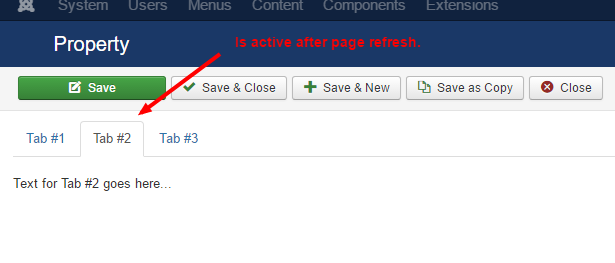
After I’ve seen different examples on the web ([here](https://forum.joomla.org/viewtopic.php?t=866166) or [here](http://joomla.stackexchange.com/questions/5675/how-do-i-set-options-for-jhtmltabs-with-bootstrap)), I’ve found a simple solution by seeing the core components of Joomla!, specifically the “com\_content”. After comparing my custom component with “com\_content”, I’ve seen that the second loads the system javascript file “/media/system/js/tabs-state.js”, instead of mine that didn’t.
So, you just have to insert the below line of code in the main file of your component. Let’s say that our component’s name is “test”. The main file will be “administrator/components/com\_test/test.php”.
Enter the below code after the line of code “defined(‘\_JEXEC’) or die;”.
```
JHtml::_('behavior.tabstate');
```
This code loads the “/media/system/js/tabs-state.js” which is a javascript behavior to allows the selected tab to be remained after save or page reload keeping the state in our local storage.
You can find a clean example (without bootstrap) to load tabs in your custom Joomla component in the docs: [https://docs.joomla.org/J3.x:Using\_the\_JHtmlTabs\_class\_in\_a\_component](https://docs.joomla.org/J3.x:Using_the_JHtmlTabs_class_in_a_component)
or simple you can try our example with bootstrap tabs:
```
'main1')); ?>
Text for Tab 1 goes here...
Text for Tab 2 goes here...
Text for Tab 3 goes here...
```
It’s not something new or a clever tip, but I hope it will help many dev colleagues that have the same issues with tab sessions in Joomla 3.x series on their custom Joomla! components.
Feel free to [contact us](https://web357.com/contact) if you need help with the above implementation into your custom Joomla! extension.
Best Regards,
Yiannis Christodoulou
Founder & Lead Developer, Web357
---
Part of [Web357](https://www.web357.com). Site map for agents: [llms.txt](https://www.web357.com/llms.txt), [llms-full.txt](https://www.web357.com/llms-full.txt). Documentation: https://docs.web357.com/. Support: https://www.web357.com/support. Append `.md` to any page URL on this site to read it as Markdown.