Login as User - Joomla! component

Login as User - Joomla! component

Wish you could see exactly what your users see? Now you can.

No more endless emails or confusing screenshots. With the Login as User Joomla! component, you jump straight into any user’s front-end experience - instantly.

Perfect for support teams, devs, and site admins who want to fix issues fast and deliver a seamless user experience.

  • avatar
  • avatar
  • avatar
  • avatar
  • avatar
  • avatar
  • avatar
  • avatar
  • avatar
  • avatar
  • avatar
  • star
  • star
  • star
  • star
  • star
5.0

trusted by 10,000+ users

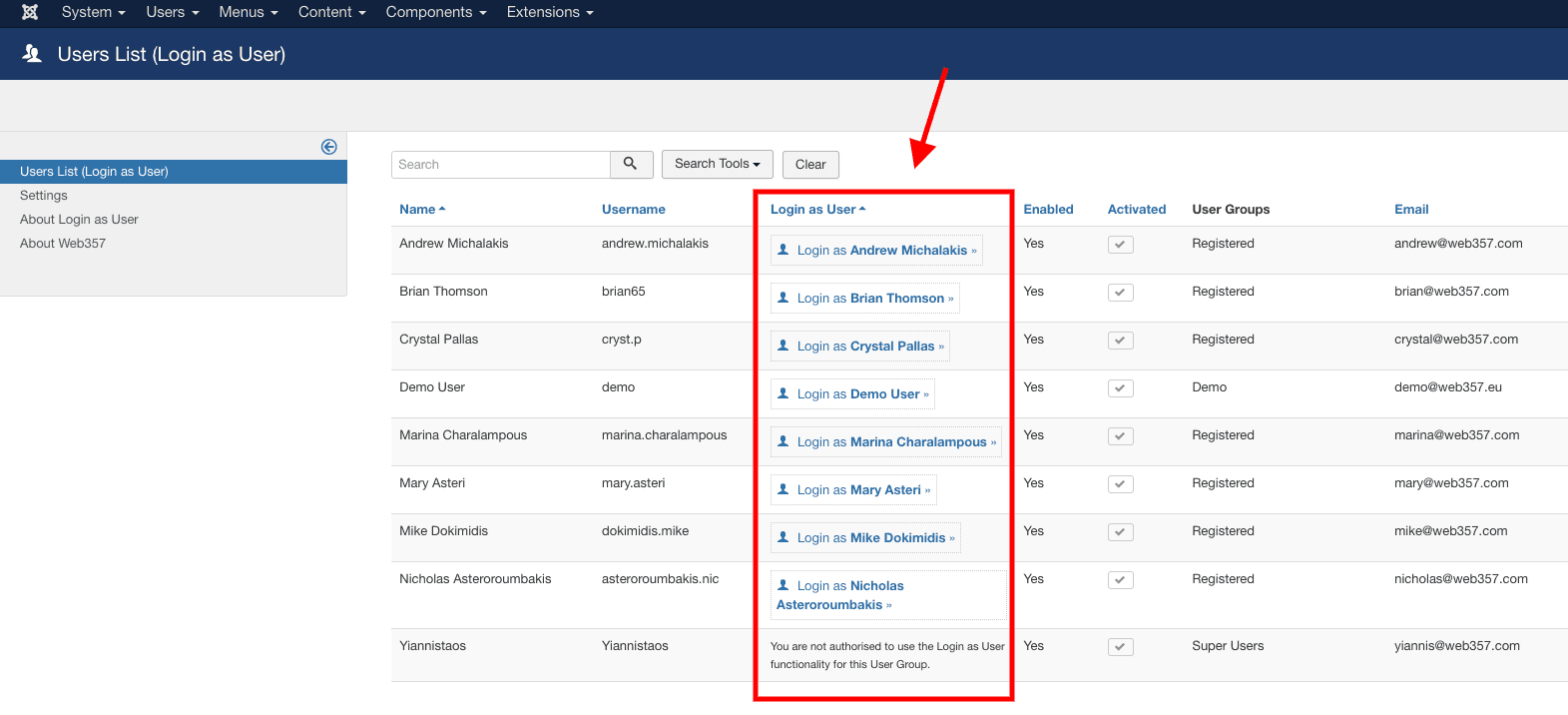
🔑 “Login as User” Button in User Lists

🔑 “Login as User” Button in User Lists

Admins can instantly access the front-end as any specific user, perfect for troubleshooting orders, forms, or personal data issues by replicating exactly what the user experiences.

🔄 Compatibility with Popular 3rd Party Extensions

🔄 Compatibility with Popular 3rd Party Extensions

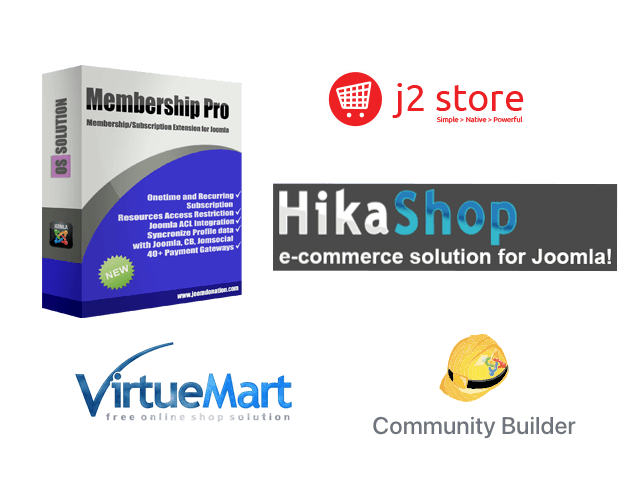
Fully compatible with top Joomla! ecommerce and community extensions including,

  • HikaShop: Adds a “Login as User” button on the “Orders” and “Customers” pages.
  • J2Store: Adds a “Login as User” button on the “Orders” and “Customers” pages under the Sales menu.
  • OS Membership PRO: Adds a “Login as User” button on the “Subscriptions” and “Subscribers” pages.
  • Community Builder: Adds a “Login as User” button on the “User Management” page.
  • VirtueMart: Adds a “Login as User” button on the “Orders” and “Shoppers” pages.

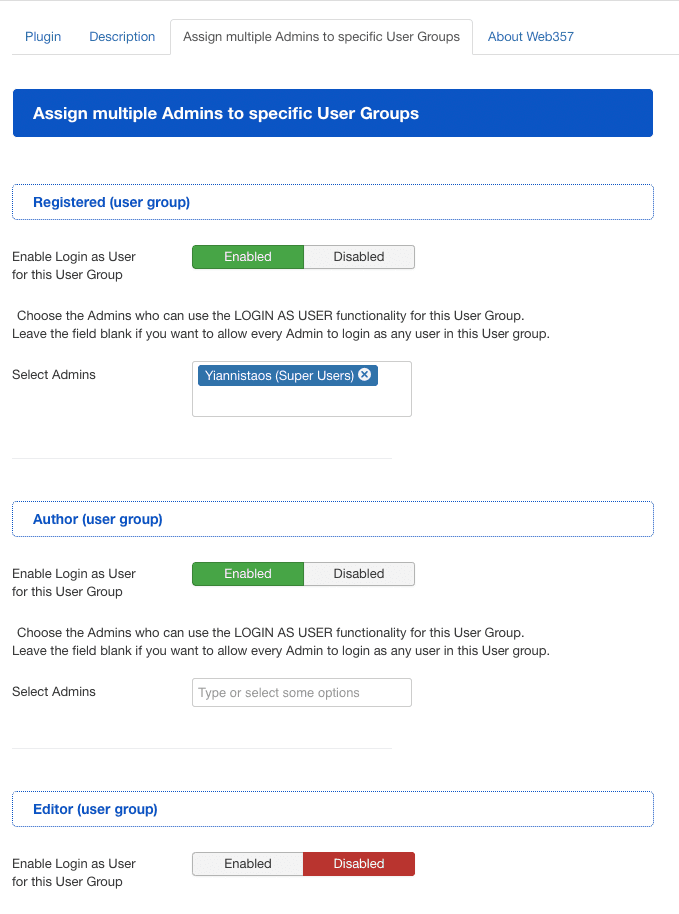
👥 Assign Multiple Admins to User Groups

👥 Assign Multiple Admins to User Groups

Easily control which admins have permission to use the “Login as User” feature on specific User Groups, ensuring secure and organized access.

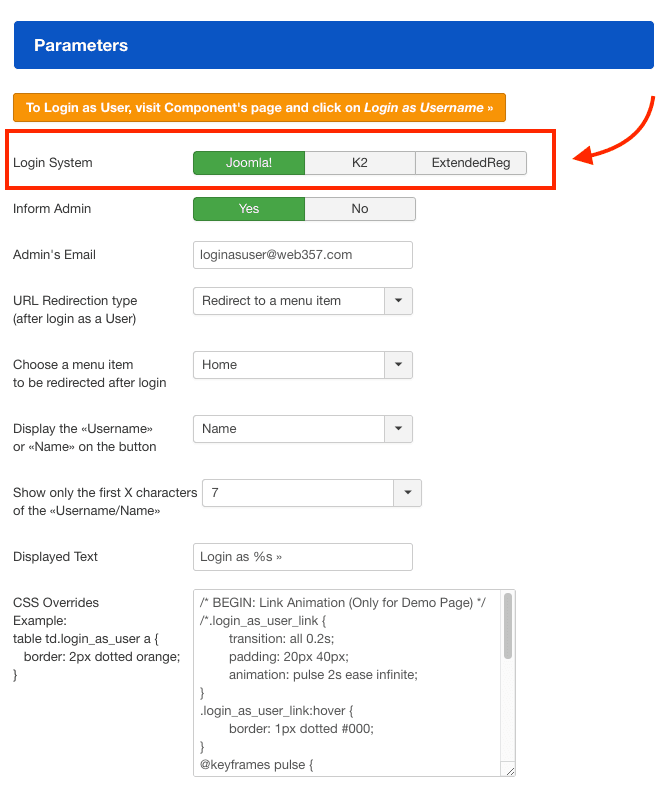
🔐 Flexible Login System Support

🔐 Flexible Login System Support

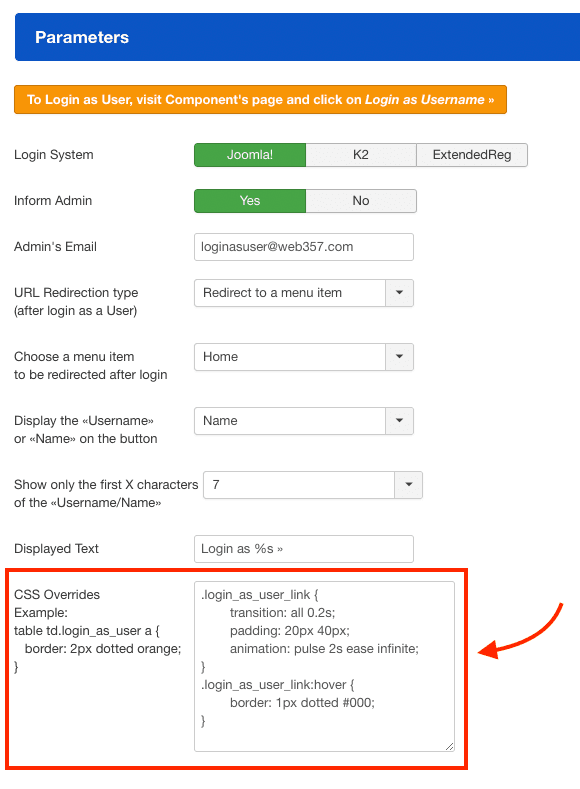
Supports Joomla! core login, K2, and ExtendedReg systems, allowing you to choose the login mechanism that fits your site setup seamlessly.

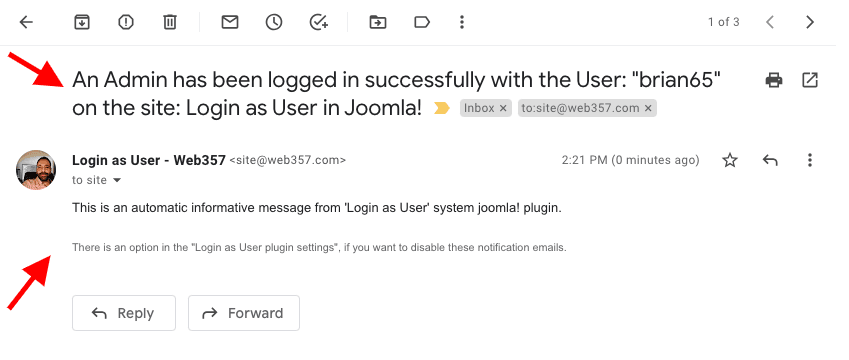
📧 Admin Email Notifications

📧 Admin Email Notifications

Admins receive customizable email alerts whenever a user is logged into via the backend, keeping your team informed in real time.

Enter Admin’s Email address (Example: info@yourdomain.com) to receive all the appropriate notifications. (If you leave this field blank, the component uses the default email from the global configuration).

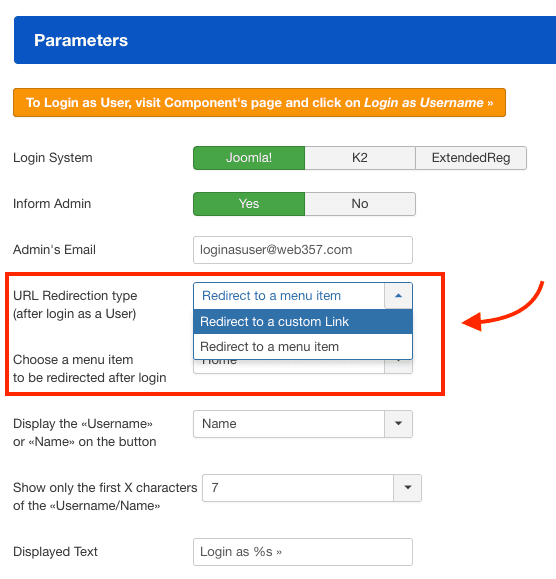
🔗 Customizable Post-Login Redirects

🔗 Customizable Post-Login Redirects

Define a URL or menu item where admins are redirected after logging in as a user, streamlining your workflow and user experience.

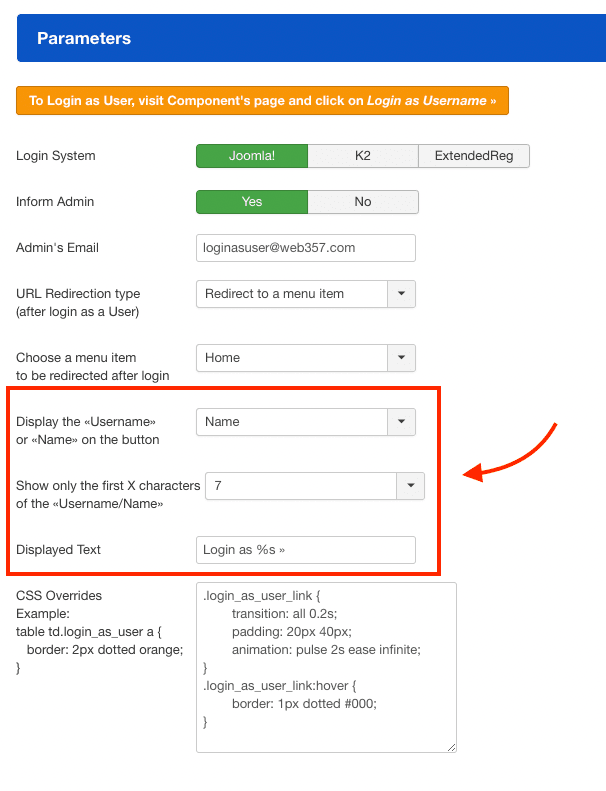
📝 Customizable Display Text

📝 Customizable Display Text

Set your preferred display text for the login button with dynamic placeholders, such as “Login as %s”, “Log in as User”, or “Log in as Client”, where %s automatically inserts the username.

🎨 Custom CSS Styling

🎨 Custom CSS Styling

Add your own CSS styles to customize the appearance of the “Login as User” button, ensuring it matches your website’s design perfectly.

🤝 Why Choose Web357?
  • 🔑 Instant User Frontend Access

    Easily log in as any Joomla! user directly from the admin panel to replicate issues and provide fast, accurate support.
  • 🔄 Third-Party Extensions Compatibility

    Seamlessly integrates with popular Joomla! extensions like HikaShop, J2Store, OS Membership PRO, Community Builder, and VirtueMart.
  • 👥 Admin Access Control & Notifications

    Assign which admins can use the feature for specific user groups and receive email notifications for all backend logins as users.
💡 Instantly step into your users’ shoes with Login as User — the ultimate Joomla! tool for replicating issues, testing permissions, and providing seamless direct support.
Why Developers Trust Our Joomla! extensions & WordPress Plugins
  • Love & Attention
    Love & Attention

    Crafted with care, driven by passion-because when you love what you do, it’s impossible to hide.

  • Premium Support
    Premium Support

    We care about your website just as much as you do. Count on us for fast, helpful support.

  • Always Fresh Ideas
    Fresh Ideas, Always

    Great ideas come from fresh thinking - and we never run out of either.

  • Clean, Reliable Code
    Clean, Reliable Code

    Our code is clean, lightweight and built to industry standards - easy to use, easy to trust.

Testimonials
10,000
happy users

Web357 creates super useful extensions. Login as User is fantastic for allowing site admins to understand the frontend UX from any user's perspective. No extra "test" users needed. Support is also amazing!

Brian Mitchell
President of InterGen Web Solutions

Web357 extensions are solid, reliable, and thoughtfully built - no fluff, just tools that do exactly what they promise. Support is incredibly responsive, and updates are clearly made with real users in mind. It's rare to find such professionalism in this space.

Zlatko Enev
Writer, Publisher - Librev.com
Tim Davis
Joomla! Evangelist

We have used Joomla and WordPress plugins by Web357 for many years in various projects. The plugins are exceptionally reliable and robust. Special thanks to Yannis, for his outstanding assistance-always responsive and professional. Highly recommended for anyone seeking quality plugins and excellent customer support.

Antonis Pavlidis
Web Designer/Developer - Dazzlink

I've been using Web357's Joomla plugins for several years and I must say I've never had any problems; they've always met my expectations! My heartfelt congratulations to the Web357 staff.

Mauro Miotello
IT Consultant and Software Developer - Ashnet Consulting

Web357 extensions are reliable, well-crafted, and consistently updated. We've used them for years across professional Joomla and WordPress projects and have always been impressed by their performance and support. A trusted part of our development toolkit.

Alexander Ioannidis
Founder & Team Lead, PROUDPIXEL
Simple Pricing

Single Extension (Pro)

39/year

Access to the Premium version of
Login as User - Joomla! component

  • Premium support for 1 year

  • Extension updates for 1 year

  • Life time usage

All Access Bundle
Loading...

20+ Premium Joomla! Extensions to supercharge your website.

  • check icon

    Premium support for 1 year

  • Extension updates for 1 year

  • Life time usage

corner upSave €426 (73% off)

money guarantee
30-day money back guarantee. No questions asked!

So much better than a trial because you can try it on your website and we will be there to fully support you during that time.

Pre-Sale FAQs
  • What am I purchasing?
    You are purchasing a Joomla! extension subscription. Once the purchase is complete, you will gain access to our members' area, where you can download the latest versions and access our private support system.
  • What payment methods do you accept?
    We accept PayPal and all major credit cards via Stripe, including Visa, MasterCard, American Express, Discover, JCB, Diner's Club, and EnRoute.
  • Do you offer a refund policy?
    Yes! We provide a 30-day money-back guarantee on all subscriptions.
  • Can I use your extensions in multiple projects?
    Yes! You can use our extensions in multiple Joomla! projects without restrictions.
  • Can I purchase just one plugin?
    Yes! You can buy a single Joomla plugin with updates & support for that specific product.
  • What's the difference between the "Single" and "Bundle" subscription?
    Single Plan – Perfect for personal use. Grants access to one premium Joomla! extension. Bundle Plan – Best value for your money, ideal for advanced users. Grants access to all Web357 premium extensions. Both plans include private support. Key Difference: With the Bundle Plan, you can download all premium Web357 extensions instead of just one.
  • Are there limits on how many times I can download my purchased extensions?
    No! You can download your Joomla! extensions unlimited times during your subscription.
  • What happens when my membership expires?
    You can continue using your downloaded extensions, but updates & support will no longer be available.
  • How does your support work?
    We provide support via: - Private Support Ticket Area - Email Assistance - Live Chat (when available)
  • I have a question. How can I contact you?
    You can contact us at support@web357.com or via our pre-sales contact form.
  • What is the license for this product?
    This product is licensed under the GNU General Public License v3.0 (GPLv3).
Product FAQs
  • Can I log in as any Joomla! user?

    Yes, admins can log in as any registered user, provided they have the necessary permissions.

  • Is this compatible with popular Joomla! ecommerce extensions?

    Absolutely. The component fully supports HikaShop, J2Store, OS Membership PRO, Community Builder, and VirtueMart.

  • How do I control which admins can use this feature?

    You can assign specific admins permissions per user group, ensuring controlled access.

  • Does the component send notifications for logins?

    Yes, admins receive email notifications every time a backend login as user occurs.

  • Can I customize the displayed login button text?

    Yes, you can personalize the button text with placeholders like “Login as %s” where %s is the username.

  • What happens after an admin logs in as a user?

    You can configure a custom URL or menu item for automatic redirect after login to streamline your workflow.

Get the Login as User - Joomla! component
& Supercharge your website
Buy Pro30 days money-back guarantee