Web357 Logo
Menu
  • Joomla! Extensions
    Browse all Joomla! Extensions
    PROPaid, no free version
    • Cookies Policy Notification BarPopular
    • Login as UserPopular
    • Monthly ArchivePopular
    • Microsoft/Outlook 365 Mail ConnectNew
    • Gmail SMTP ConnectNew
    • JMail LogNew
    • Multilingual 404 Page SelectorNew
    • Multiple Categories for K2
    • Contact Info
    Free + PROFree version, paid PRO upgrade
    • Fix 404 Error Links
    • Limit Active Logins
    • Failed Login AttemptsPopular
    • JLogsNew
    • VirtueMart Sales
    • Support Hours
    FreeFree download
    • Display Date and TimePopular
    • CountdownPopular
    • www Redirect
    • VirtueMart Count Products
    • Fixed HTML Toolbar
    • Web357 Framework
    All Access Joomla! Bundle: just €159

    The PRO version of all 15 paid Joomla! extensions, every new one we release, and premium support. All for €159 a year.

    The All Access Bundle

    arrow upSave €426 (73% off)

  • WordPress Plugins
    Browse all WordPress Plugins
    Free + PROFree version, paid PRO upgrade
    • Login as a UserPopular
    • Cookie Consent ManagerNew
    • Microsoft 365 & Outlook MailerNew
    • Gmail SMTP ConnectNew
    • Easy Custom Code (LESS/CSS/JS)
    • Mail LogNew
    • Fix 404 Error LinksNew
    • Limit Active LoginsNew
    FreeFree download
    • Count Characters, Words and Paragraphs
    • Fixed HTML Toolbar
    All Access WordPress Bundle: just €159

    The PRO version of all 8 paid WordPress plugins, every new one we release, and premium support. All for €159 a year.

    The All Access Bundle

    arrow upSave €153 (49% off)

  • Maintenance
  • Support
  • Blog
  • My Account

My Account

Web357 logo

Web357 delivers premium plugins and tailored solutions for Joomla! and WordPress websites. Since 2014, our experienced team has been committed to improving the performance, usability and security of these platforms. We focus on building tools that empower developers, digital agencies, and web professionals, backed by expert support and ongoing maintenance.

Company
  • About Us
  • Imprint
  • Media kit
  • Partners
  • Blog
  • Contact Us
  • Donate
Support
  • Help & Support
  • Pre-sales FAQ
  • Documentation
  • Maintenance
  • License
  • Contribute Translations
  • Latest Releases
Joomla!
  • Joomla! Extensions
  • Joomla! Bundle
WordPress
  • WordPress Plugins
  • WordPress Bundle

© 2026 Web357. All rights reserved.

  • Terms of Service
  • Privacy Policy
  • Refund Policy

Easy Custom CSS, LESS and JS for WordPress

Easy Custom CSS, LESS and JS for WordPress

You want to change a colour, hide a button or add a tracking code. Editing the theme means your change is gone after the next theme update.

Easy Custom Code adds LESS, CSS, JavaScript and HTML editors to the WordPress Customizer. You write the code, preview it, and click Publish. The plugin saves it in its own files, so theme updates leave it alone.

The free version includes every editor and external files. PRO adds minified CSS and a full-screen editor.

Free versionLive demo
  • 1 year of updates and support
  • 30-day money back guarantee
Easy Custom CSS, LESS and JS for WordPress
Compatibility
WordPress5.xWordPress6.xWordPress7.x
WordPress.org
100+ installs
Version
v1.1.5Changelog→
  • avatar
  • avatar
  • avatar
  • avatar
  • avatar
  • avatar
  • avatar
  • avatar
  • avatar
  • avatar
  • avatar
12,500+ customers since 2014

100+ active installs on wordpress.org

🎨 Custom LESS and CSS

🎨 Custom LESS and CSS

🎨 Custom LESS and CSS

Change the look of your site without a child theme.

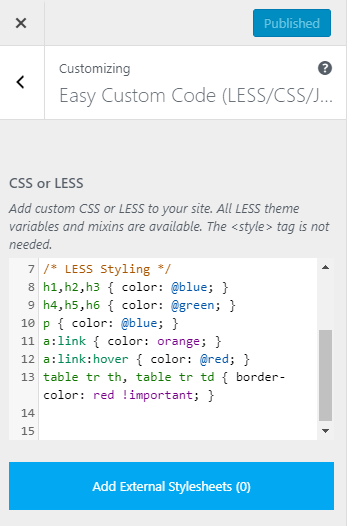
Open Appearance → Customize → Easy Custom Code and write CSS or LESS in the editor. Plain CSS works as it is, and LESS adds variables, nesting and mixins.

  • The preview updates before you publish
  • The code is compiled into one stylesheet
  • It survives theme updates

🌐 Unlimited External Stylesheets

🌐 Unlimited External Stylesheets

🌐 Unlimited External Stylesheets

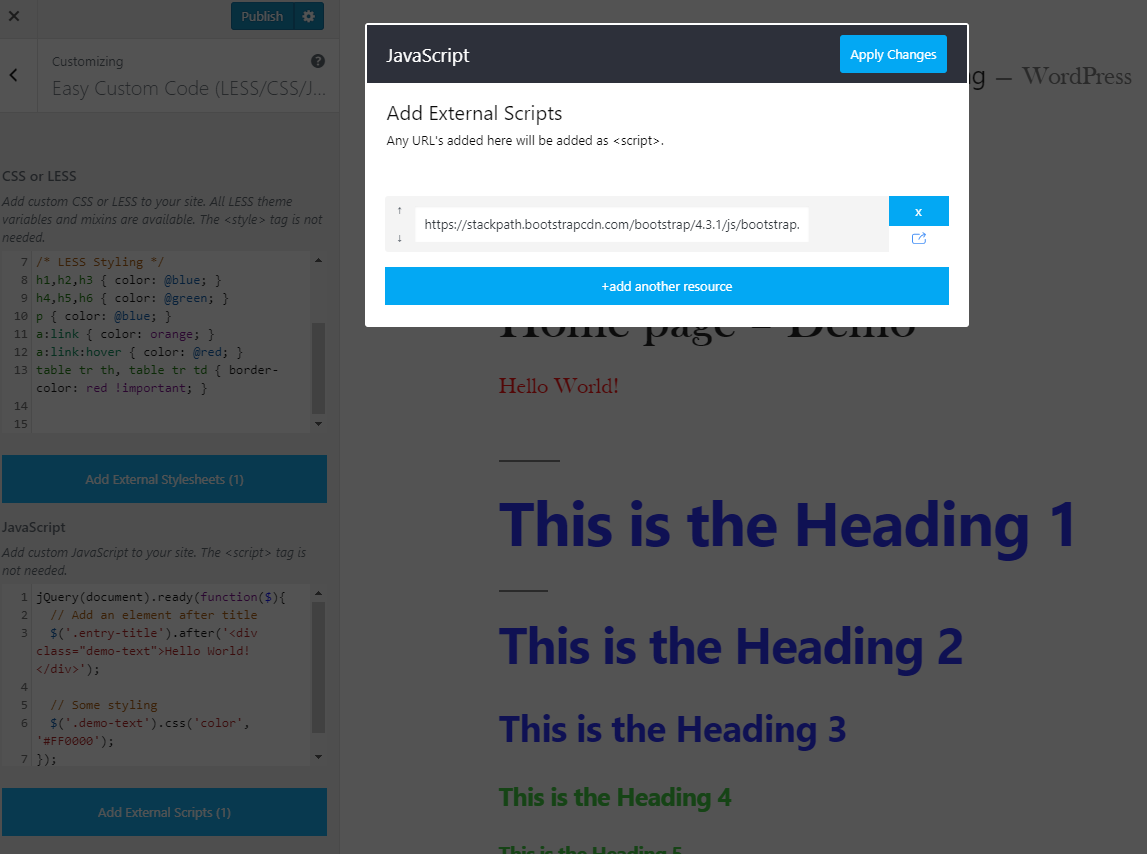
Load a CSS library from a URL.

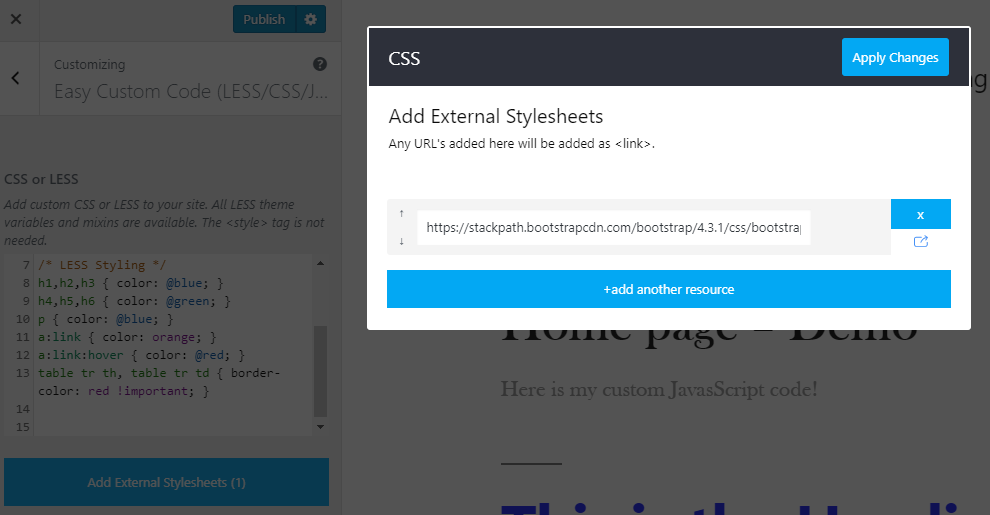
Paste the address of Bootstrap, Font Awesome or any other stylesheet in the external stylesheets window. The plugin adds the link tag for you.

  • As many stylesheets as you need
  • Reorder, add and remove rows in one window
  • No theme file to edit

📜 Custom JavaScript

📜 Custom JavaScript

📜 Custom JavaScript

Add a script without touching the theme.

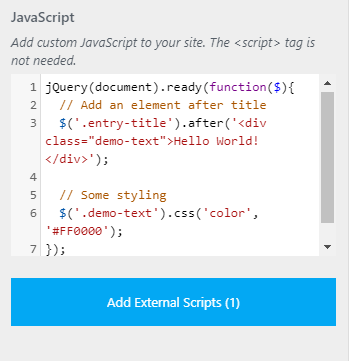
Write JavaScript or jQuery in its own editor. You do not need script tags, and the code is saved to a separate file.

  • Loads in the footer by default
  • Can be moved to the head in Settings
  • Survives theme updates

📥 Unlimited External Scripts

📥 Unlimited External Scripts

📥 Unlimited External Scripts

Load a script from a URL, in the head or the footer.

Paste the address of an SDK, a widget or any other script in the external scripts window. The plugin adds the script tags in the position you chose.

  • As many scripts as you need
  • Same position setting as your own JavaScript
  • No theme file to edit

🧹 Minified CSS Output

🧹 Minified CSS Output

🧹 Minified CSS Output

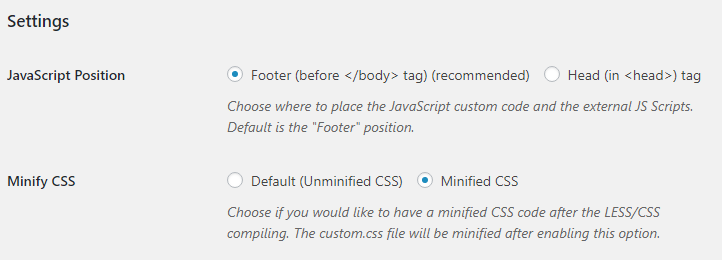
Serve a smaller stylesheet.

Minified CSS is in PRO. Turn on Minify CSS and the compiled stylesheet is written without spaces and comments after each publish.

  • One switch in Settings
  • Your editor keeps the readable version
  • Works with caching and CDN plugins

🧾 Custom HTML in Head and Body

🧾 Custom HTML in Head and Body

🧾 Custom HTML in Head and Body

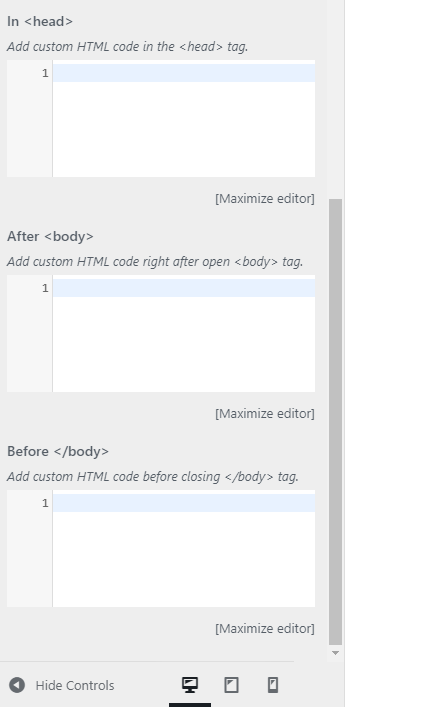
Paste tracking codes and verification tags where they belong.

The HTML code section has three editors: inside the head tag, right after the opening body tag, and before the closing body tag.

  • Google Analytics, Tag Manager or Meta Pixel snippets
  • Site verification meta tags
  • Chat widgets and other third-party code

⚙️ Script Position and CSS Settings

⚙️ Script Position and CSS Settings

⚙️ Script Position and CSS Settings

Decide where scripts load and how CSS is written.

On the Settings page, choose whether your JavaScript and external scripts load in the footer or in the head.

  • Footer is the default and the faster choice
  • Head is there for scripts that must run first
  • Minify CSS is in PRO

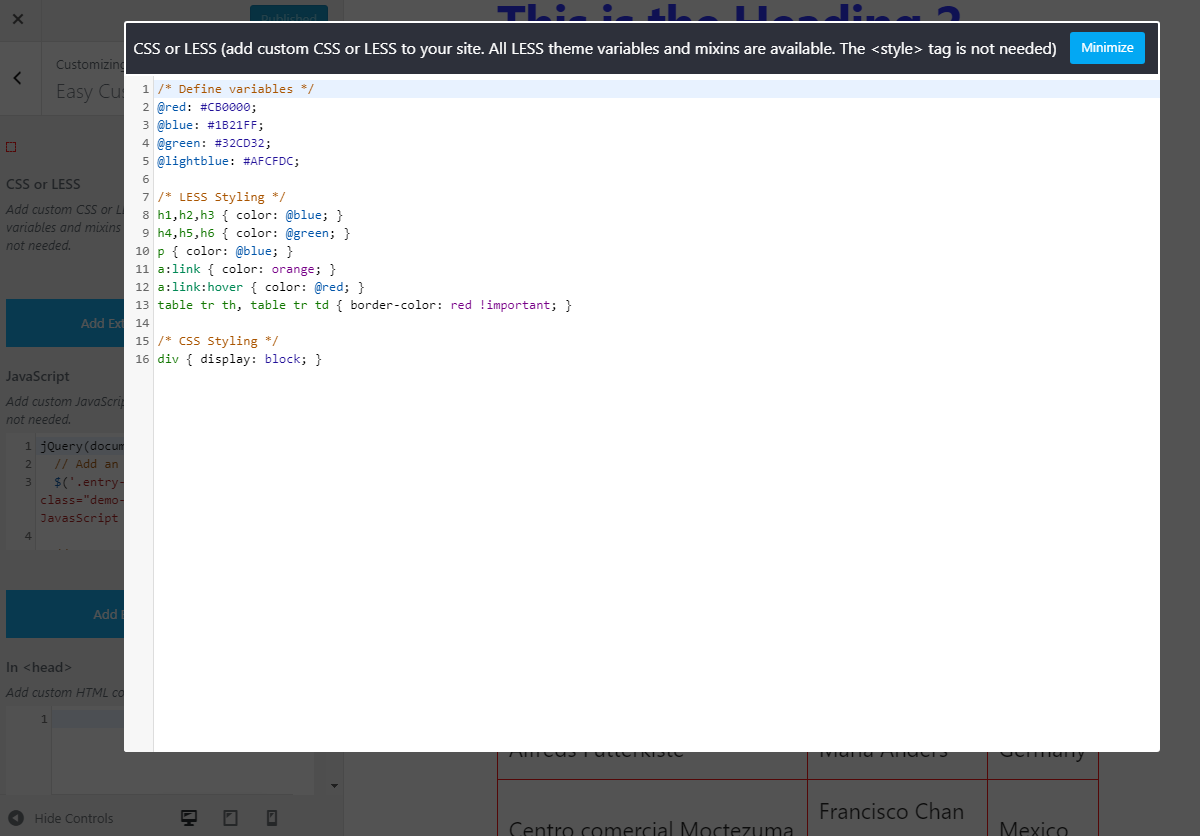
🖥 Maximize Editor Link

🖥 Maximize Editor Link

🖥 Maximize Editor Link

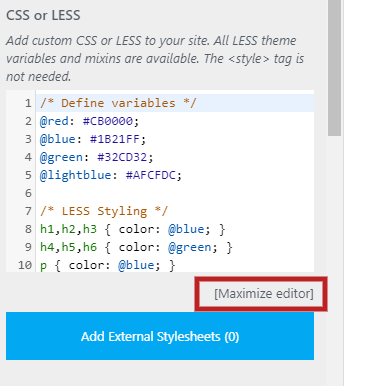
Open the editor full screen for longer code.

The full-screen editor is in PRO. Click [Maximize editor] under any editor to open it full screen.

  • Works for CSS, JavaScript and HTML
  • Click Minimize to return to the Customizer
  • More lines in view on small screens

🧊 Full-Screen Code Editor

🧊 Full-Screen Code Editor

🧊 Full-Screen Code Editor

Write and review code without the Customizer's narrow column.

In PRO. The full-screen editor gives the code the whole window, so long stylesheets and scripts are easier to read.

  • Same editor, more space
  • Your changes stay in the Customizer preview
  • Close it when you are done
Powerful Features
  • 💻 Code in the right place

    Add HTML inside the head tag, right after the opening body tag, or before the closing body tag, from the HTML code section, without touching theme files.
  • 🔁 Survives theme updates

    Your code is stored by the plugin and written to its own files, so switching or updating the theme does not wipe it. The FAQ shows where the files are.
  • 🧪 Try it before you install

    Open the live demo to see the editors in the Customizer, then install the free version from wordpress.org.
Your changes survive theme updates, because the code lives in the plugin, not in the theme. Easy Custom Code is free on wordpress.org, and the CSS and LESS guide shows the first steps.
Simple Pricing

Single Plugin (Pro)

€39/year

Access to the Premium version of
Easy Custom Code (LESS/CSS/JS)

Number of websites

Use it on any number of sites. Licenses for 1 website.

  • Premium support for 1 year

  • Plugin updates for 1 year

  • Life time usage

Ideal when you need just this one plugin.

Add €120 and get all 8 plugins on 1 website.

For agencies & multi-site owners
All Access Bundle
€159/year

Costs less than 5 single plugins
About €19.88 per plugin

All 8 premium WordPress plugins, plus every new one we release.

Number of websites

Use all plugins on any number of sites. Licenses for 1 website.

Everything in Single Plugin, plus:

  • The other 7 premium WordPress plugins

    Login as a UserCookie Consent ManagerMicrosoft 365 & Outlook MailerGmail SMTP ConnectMail LogFix 404 Error Links
  • Every new plugin we release

  • One subscription, one renewal

  • Premium support for 1 year

  • Plugin updates for 1 year

  • Life time usage

money guarantee
30-day money back guarantee. No questions asked!

So much better than a trial because you can try it on your website and we will be there to fully support you during that time.

Free vs PRO

The PRO subscription includes 1 year of updates and priority support. You keep using the plugin after it expires.

FeaturesFREEPRO
Custom LESS/CSS code
Add custom CSS or LESS to your site. All LESS theme variables and mixins are available.
checkcheck
Unlimited external Stylesheets
Add external Stylesheets into your site.
checkcheck
Custom JavaScript code
Add custom JavaScript to your site.
checkcheck
Unlimited external Scripts
Add external Scripts into your site.
checkcheck
JavaScript Position (head or footer)
Choose where to place the JavaScript custom code and the external JS Scripts.
checkcheck
Add custom HTML code
Add custom HTML code in the head tag, right after open body tag and before closing body tag.
checkcheck
Maximize editor
You can open each code editor in a maximized modal window.
closecheck
Minified CSS code
Choose if you would like to have a minified CSS code after the LESS/CSS compiling. The custom.css file will be minified after enabling this option.
closecheck
Pre-Sale FAQs
  • What am I purchasing?
    You are purchasing a WordPress plugin subscription. Once the purchase is complete, you will gain access to our members' area, where you can download the latest versions and access our private support system.
  • What payment methods do you accept?
    We accept PayPal and all major credit cards via Stripe, including Visa, MasterCard, American Express, Discover, JCB, Diner's Club, and EnRoute.
  • Do you offer a refund policy?
    Yes! We provide a 30-day money-back guarantee on all subscriptions.
  • Can I use your plugins on more than one website?
    Yes. Each subscription covers 1, 3, 5 or unlimited WordPress websites, depending on the plan you choose on the pricing table.
  • Can I purchase just one plugin?
    Yes! You can buy a single WordPress plugin with updates & support for that specific product.
  • What's the difference between the "Single" and "Bundle" subscription?
    Single Plan – Perfect for personal use. Grants access to one premium WordPress plugin. Bundle Plan – Best value for your money, ideal for advanced users. Grants access to all Web357 premium plugins. Both plans include private support. Key Difference: With the Bundle Plan, you can download all premium Web357 plugins instead of just one.
  • Are there limits on how many times I can download my purchased plugins?
    No! You can download your WordPress plugins unlimited times during your subscription.
  • What happens when my membership expires?
    You can continue using your downloaded plugins, but updates & support will no longer be available.
  • How does your support work?
    We provide support via: - Private Support Ticket Area - Email Assistance - Live Chat (when available)
  • I have a question. How can I contact you?
    You can contact us at support@web357.com or via our pre-sales contact form.
  • What is the license for this product?
    This product is licensed under the GNU General Public License v3.0 (GPLv3).
Product FAQs
  • Which WordPress versions are supported?

    WordPress 5.3 or newer, tested up to 7.1, with PHP 7.3 or newer. The installation guide has the steps.

  • What is free, and what is PRO?

    Free: the LESS/CSS, JavaScript and HTML editors, unlimited external stylesheets and scripts, and the JavaScript position setting.

    PRO: minified CSS output, the full-screen editor, and 1 year of updates and support.

  • Do I need to know LESS?

    No. Plain CSS works in the same editor. LESS is there if you want variables, nesting and mixins, as the CSS and LESS guide shows.

  • Can I add Google Analytics, Tag Manager or a chat widget?

    Yes. Paste the snippet in one of the three HTML code editors, usually in the head tag or before the closing body tag.

  • Can I load code on some pages only?

    No. The code is added to every page of the site, as the FAQ explains. For page-specific scripts, use the conditions of your tag manager.

  • My changes do not show on the site. What should I check?

    Click Publish in the Customizer, then clear your caching plugin and browser cache. The FAQ has the full checklist.

  • What happens after my PRO subscription expires?

    PRO keeps working on your sites. You can continue using the version you downloaded, but new releases and support stop until you renew, which you can do at any time from your Web357 account at the current plan prices.

Testimonials
12,500+
happy customers
  • Web357 creates super useful extensions. Login as User is fantastic for allowing site admins to understand the frontend UX from any user's perspective. No extra "test" users needed. Support is also amazing!

    Brian Mitchell
    President of InterGen Web Solutions
  • Web357 extensions are solid, reliable, and thoughtfully built - no fluff, just tools that do exactly what they promise. Support is incredibly responsive, and updates are clearly made with real users in mind. It's rare to find such professionalism in this space.

    Zlatko Enev
    Writer, Publisher - Librev.com
  • Tim Davis
    Joomla! Evangelist
  • We have used Joomla and WordPress plugins by Web357 for many years in various projects. The plugins are exceptionally reliable and robust. Special thanks to Yannis, for his outstanding assistance-always responsive and professional. Highly recommended for anyone seeking quality plugins and excellent customer support.

    Antonis Pavlidis
    Web Designer/Developer - Dazzlink
  • I've been using Web357's Joomla plugins for several years and I must say I've never had any problems; they've always met my expectations! My heartfelt congratulations to the Web357 staff.

    Mauro Miotello
    IT Consultant and Software Developer - Ashnet Consulting
  • Web357 extensions are reliable, well-crafted, and consistently updated. We've used them for years across professional Joomla and WordPress projects and have always been impressed by their performance and support. A trusted part of our development toolkit.

    Alexander Ioannidis
    Founder & Team Lead, PROUDPIXEL

Web357 creates super useful extensions. Login as User is fantastic for allowing site admins to understand the frontend UX from any user's perspective. No extra "test" users needed. Support is also amazing!

Brian Mitchell
President of InterGen Web Solutions

Web357 extensions are solid, reliable, and thoughtfully built - no fluff, just tools that do exactly what they promise. Support is incredibly responsive, and updates are clearly made with real users in mind. It's rare to find such professionalism in this space.

Zlatko Enev
Writer, Publisher - Librev.com
Tim Davis
Joomla! Evangelist

We have used Joomla and WordPress plugins by Web357 for many years in various projects. The plugins are exceptionally reliable and robust. Special thanks to Yannis, for his outstanding assistance-always responsive and professional. Highly recommended for anyone seeking quality plugins and excellent customer support.

Antonis Pavlidis
Web Designer/Developer - Dazzlink

I've been using Web357's Joomla plugins for several years and I must say I've never had any problems; they've always met my expectations! My heartfelt congratulations to the Web357 staff.

Mauro Miotello
IT Consultant and Software Developer - Ashnet Consulting

Web357 extensions are reliable, well-crafted, and consistently updated. We've used them for years across professional Joomla and WordPress projects and have always been impressed by their performance and support. A trusted part of our development toolkit.

Alexander Ioannidis
Founder & Team Lead, PROUDPIXEL
View all testimonials
Why Developers Trust Our Joomla! extensions & WordPress Plugins
  • Love & Attention
    Love & Attention

    Crafted with care, driven by passion, because when you love what you do, it’s impossible to hide.

  • Premium Support
    Premium Support

    We care about your website just as much as you do. Count on us for fast, helpful support.

  • Always Fresh Ideas
    Fresh Ideas, Always

    Great ideas come from fresh thinking, and we never run out of either.

  • Clean, Reliable Code
    Clean, Reliable Code

    Our code is clean, lightweight and built to industry standards, easy to use, easy to trust.

Latest Version

v1.1.5

View Changelog
WordPress Compatibility
WordPress5.xWordPress6.xWordPress7.x
License

GNU/GPL v3

WordPress.org
WordPressTry the free version

100+ active installs

Get Easy Custom Code (LESS/CSS/JS)

Add your own LESS, CSS, JavaScript and HTML from the WordPress Customizer, without a child theme or editing theme files.

Buy PRO30-day money back guarantee

Easy Custom CSS, LESS and JS

From €39/year · 30-day money back